Start with a particular coin and exchange
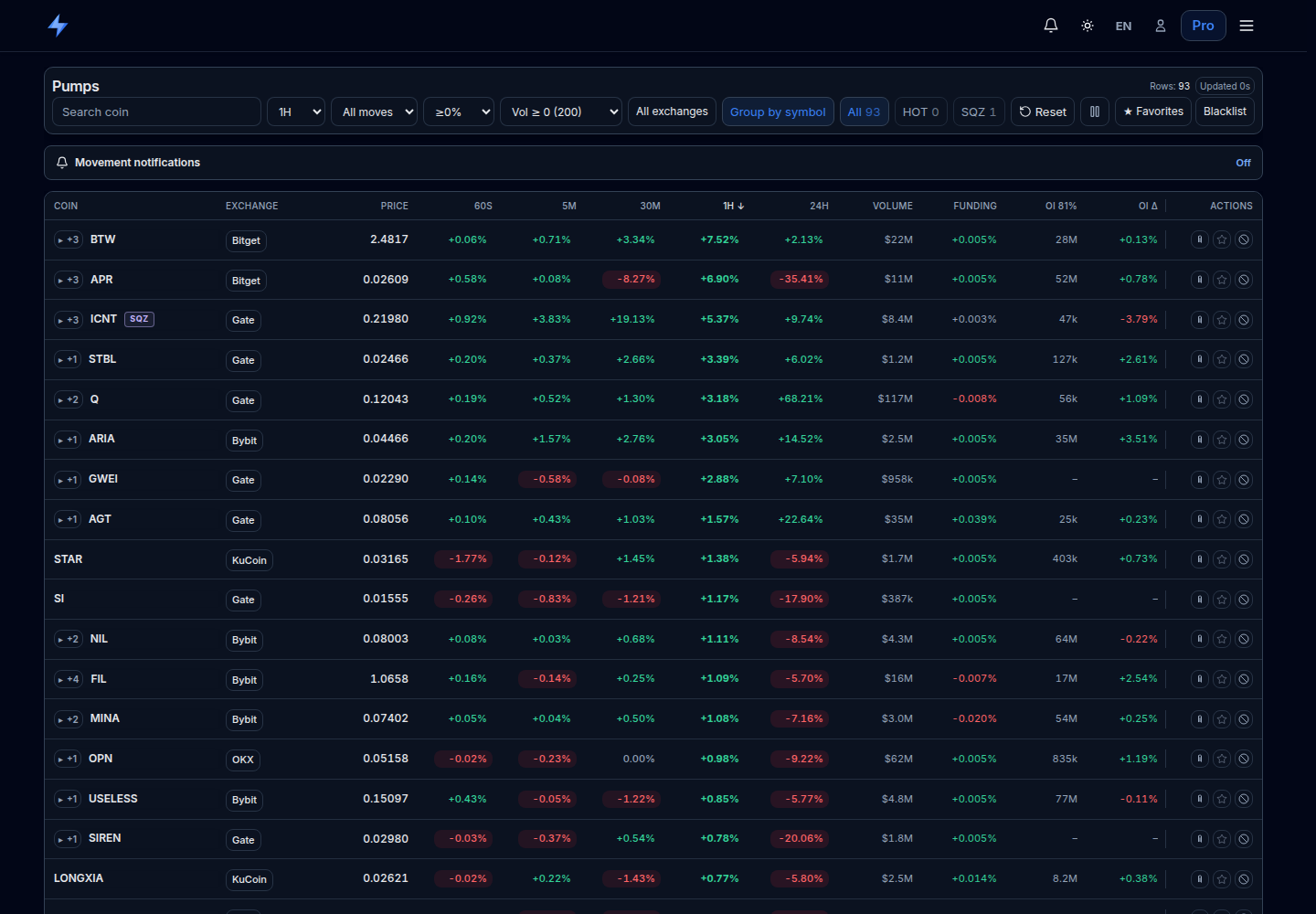
Open Pumps and pick a row. Read the coin, exchange and price before the percentages. The same ticker on two exchanges represents two separate markets, each with its own price, liquidity and observation history.
With grouping by symbol enabled, the “+” control reveals other available venues for that coin. The first row of a group is not a market-wide average. Compare the venues using the same time window.
Your first task is to describe the observation precisely: “On this venue, price changed by this amount over this window.” The page name “Pumps” does not establish manipulation or turn a row into a recommendation to buy.
 Open the original in a new tab
Why the daily change can be up while the hourly change is down
The board has 60s, 5M, 30M, 1H and 24H windows. Each compares the price with its own starting point. Do not add overlapping returns: the latest five minutes are already part of the latest hour.
Worked example: one price, three comparisons
Assume complete history. The price is $1.10 now, $1.00 five minutes ago, $1.20 an hour ago and $0.80 a day ago. These are invented teaching values, not a record of an actual trade.
| Window | Calculation | Change |
|---|---|---|
| 5M | (1.10 / 1.00 − 1) × 100 | +10.00% |
| 1H | (1.10 / 1.20 − 1) × 100 | −8.33% |
| 24H | (1.10 / 0.80 − 1) × 100 | +37.50% |
All three readings can be correct. Price rose over the latest five minutes but remains below its level an hour ago and above its level a day ago. One green column cannot describe the entire price path.
The selected period controls sorting. The “≥ %” filter can keep a row because of a large move in another window: it checks the largest absolute change among available columns. For example, a 5% threshold can retain a coin with 1H +1% if its 24H reading is +8%.
What volume and open interest add
The Volume column and Vol filter refer to 24-hour turnover. They help compare overall market activity but do not show how much traded during the selected five minutes. Open interest, or OI, refers to outstanding derivative contracts. CME Group explains the distinction between trading volume and open contracts.
OI Δ is the percentage change in open interest. In Pumps it follows the last selected price window: compare it with 1H after selecting 1H and with 5M after selecting 5M. Sorting by volume or OI retains that OI Δ window; the column-header tooltip identifies it.
Check units before comparing absolute OI. Venues and contract types can report it in coins, contracts or money; Bybit’s documentation, for example, distinguishes units for linear and inverse contracts. If OI is expressed in money, the asset price also affects its change.
An interpretation you can check
Suppose price rose 4% over an hour and OI in consistent units rose from 100,000 to 110,000 contracts: OI Δ is +10%. This combines a higher price with increased outstanding exposure. It does not tell you how many new participants arrived or which side will be right: a contract has both a long and a short.
If OI fell while price rose, position reduction is a possible explanation. Calling the event a liquidation or a short squeeze requires additional evidence. The price-and-OI table alone does not establish the cause.
A dash, a tilde and the age of the snapshot
A dash means a usable value is unavailable, not a 0% change. A new market or an interruption in collection can leave too little history for a longer window. OI is also unavailable for some venue feeds, so a missing value does not establish that no positions are open.
A “~” before a price change indicates a partial window according to the supplied coverage data. On desktop, the cell tooltip shows the coverage percentage. For example, ~+2% at 40% coverage should not be presented as a full-hour return. Dividing 2% by 0.4 would assume a price path you do not know.
Check “Updated” or “Paused” in the top bar. Pausing helps you read a row but freezes the snapshot. A message appears when updates are unavailable; keeping the table open does not make its data current.
“Recent signals” records detections
A separate “Recent signals” section sits below the board. Each event shows its exchange, move, window in seconds, detection price and event time. Those values describe a past detection; they do not replace the current market row.
Worked example: a signal recorded +6% over 60 seconds at 12:00. You open the page at 12:20. The +6% still describes the 12:00 event; it says nothing about the outcome of buying at 12:20. Find the same market in the main board and check its current windows and freshness.
If you look for a news explanation, match the timestamp and exact asset to the primary source. A publication near a price move is a reason to investigate, not proof that it caused the move.
Five steps to repeat the analysis
- Open Pumps, find a coin and choose the venue. Expand the other available markets if grouping is enabled.
- Select 5M or 1H for sorting and read the neighboring windows. Reverse the sort direction if you want to inspect declines.
- Check 24-hour volume and OI Δ for the same window. Note missing values and partial coverage separately.
- Check the update status and compare the current row with a recent signal if one exists.
- Use the exchange button to open the particular market. Before assessing execution, check the contract, bid–ask spread and order-book depth: large daily turnover alone does not guarantee your size at the displayed price.
Open Pumps and inspect one row
For the next step, read how slippage changes execution prices. If funding caught your attention, start with payment mechanics and settlement intervals.
Sources and the scope of the examples
The table behavior was checked against VoltArb’s Pumps component on October 18, 2026. Numerical examples in this text were created for teaching; they are not market signals, trades or backtest results.
The open-interest definitions and unit differences were checked against the CME Group and Bybit primary sources linked above. Check the chosen exchange for the particular contract rules and data freshness.