Choose the Workspace That Answers Your Question
A spread is a price difference between two markets. Funding is a periodic payment between long and short holders of a perpetual contract. VoltArb separates these questions: a high rate on one contract and a viable two-leg route require different checks.
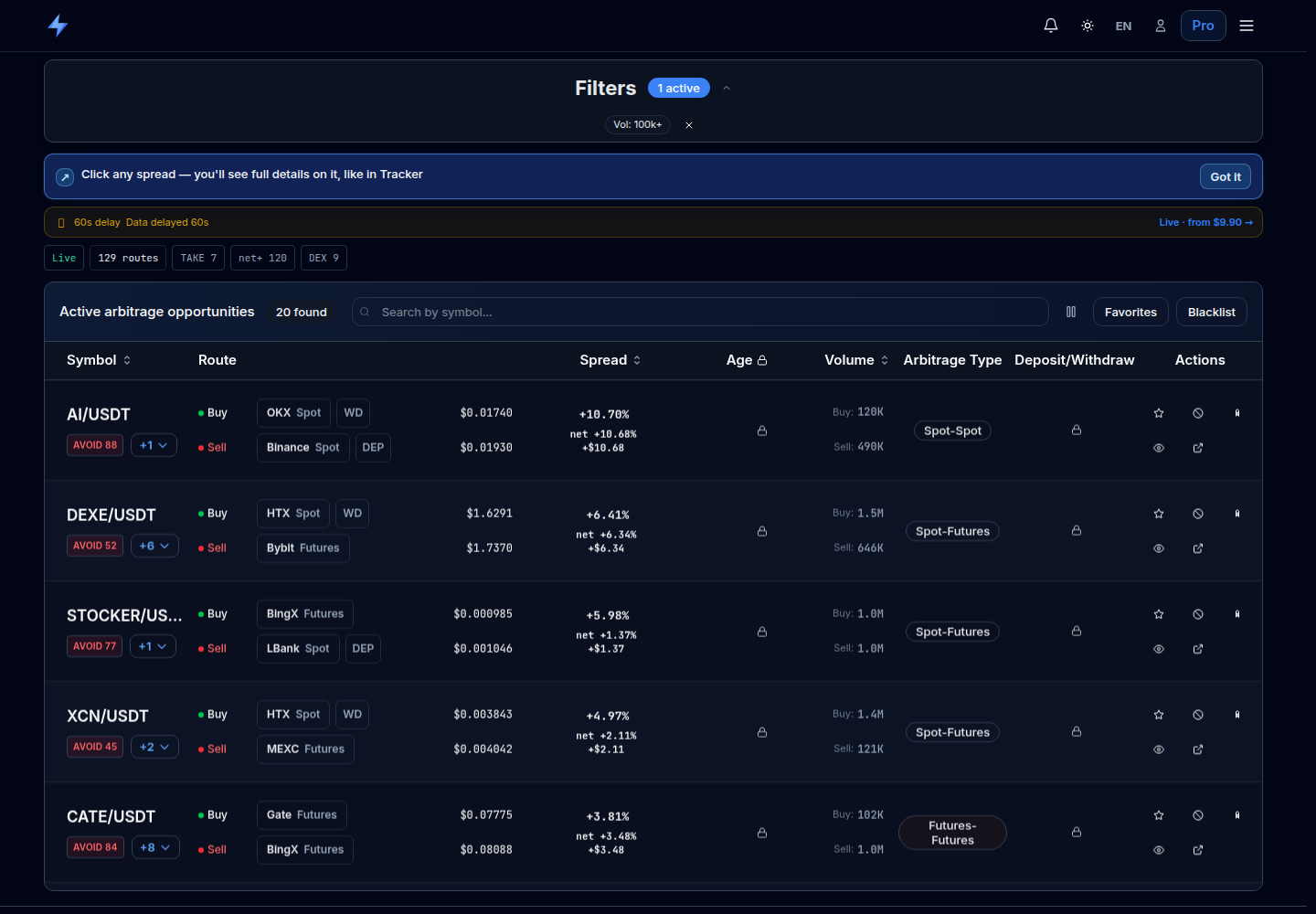
Inspect the buy and sell venues, market types, volumes and transfer availability. Open a row to investigate its route.
Compare individual contract rates in Table or Heatmap view. This section is free.
Arbitrage helps research a long/short pair. Watchlist keeps selected routes for follow-up. Access requires Pro.
Filter for Markets You Can Actually Use
Open Scanner and use search to find one asset. Then expand the filters. Select buy and sell venues separately: an account does not automatically give you access to every pair, contract type or transfer route.
Arbitrage type
Start with one type you understand, such as spot–spot or futures–futures. Execution and cost components differ.
Spread and volume
Set a range for your research. Daily volume helps narrow markets, but it does not tell you how much can fill at the best price now.
Asset availability
For a transfer route, check withdrawals at the origin and deposits at the destination. An unknown status is not confirmation that a transfer will work.
If the list is empty, reset the filters and add them one at a time. There may be no matching rows, or data may still be loading. An empty result does not prove that no price difference exists anywhere.
Read the Row Before Opening the Exchanges
First check the asset and its units: the same ticker can refer to different tokens, and a futures symbol can represent multiple units of the underlying. Then identify the intended buy or long venue and the sell or short venue.
For a market buy, inspect the ask side: resting sell orders. For a market sell, inspect bids. The last trade, mid and mark price are not promises of an executable price. Also check update times and data warnings.
 Open the original in a new tab
Practical step: open one row and compare both sides in the order books and All prices panel. “vs med” provides context across available venues; see the guide to Fair Price and the median.
Funding Rates: Table for Detail, Heatmap for Comparison
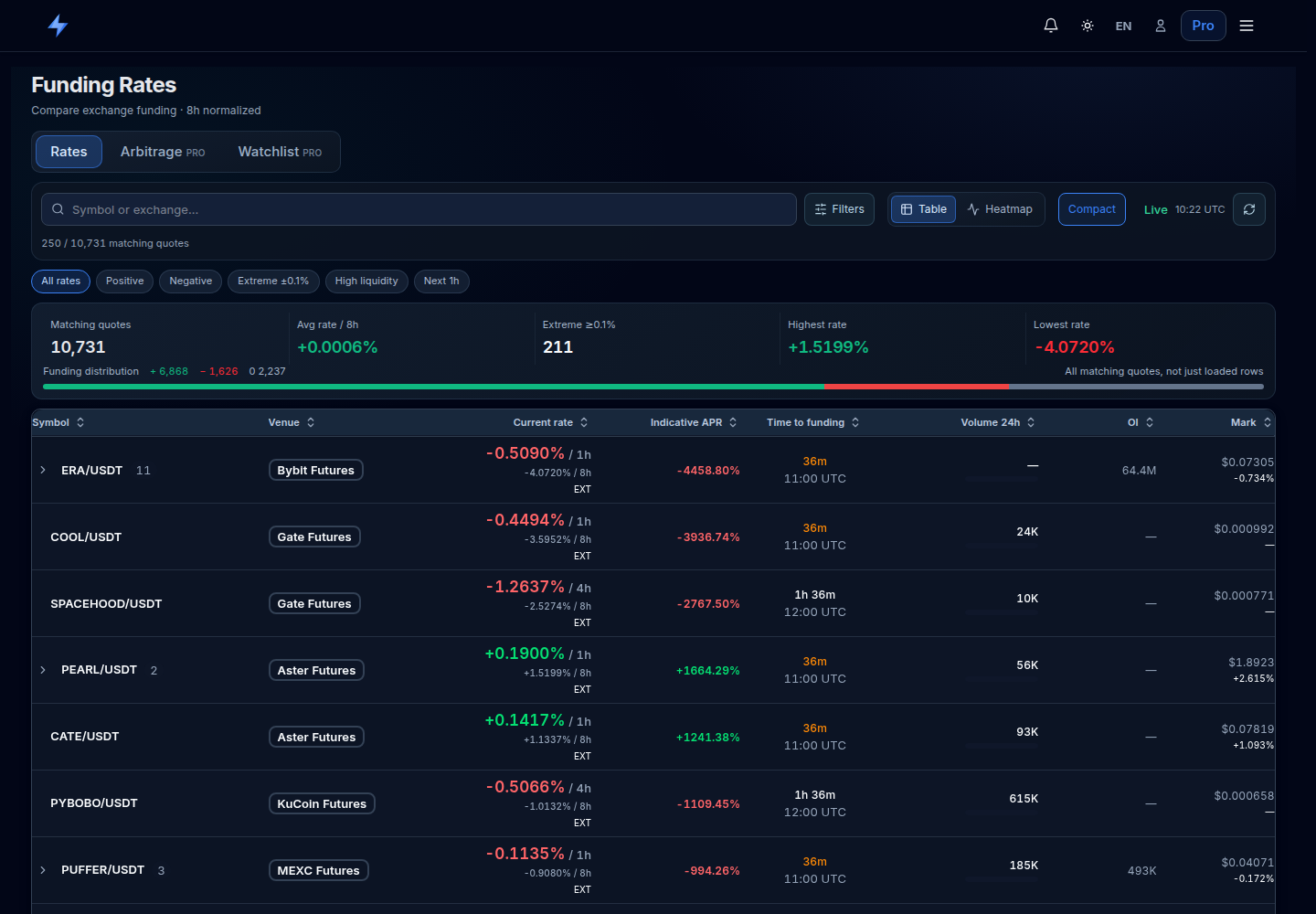
Open free Rates. Search for a symbol or exchange. Quick filters select positive or negative rates; advanced filters refine venues, volume, rate range, APR and interval. The high-volume preset filters daily turnover, not executable order-book depth.
Table
Find an asset and expand a row with several venues. Compare the rate, native venue interval, next funding time, volume and available supporting metrics. A dash means a value is missing, not zero.
Heatmap
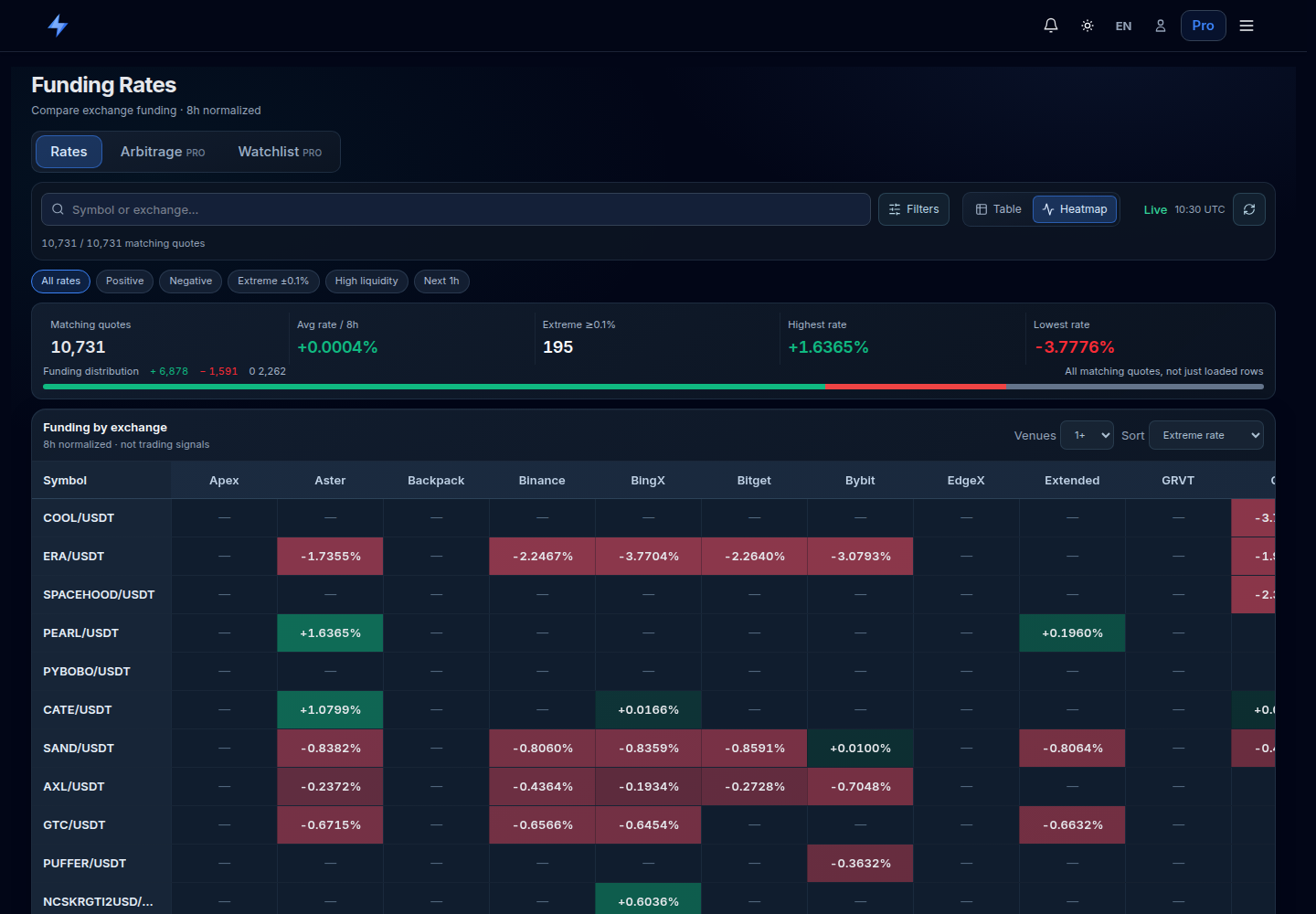
Switch to Heatmap to compare venues through cell colors and values. Color represents the rate’s sign and magnitude, not the profitability of your position. Check the quote coverage counter: additional venues may still be loading.
 Open the original in a new tab
VoltArb compares rates on an 8-hour basis. For example, an illustrative +0.01% per hour corresponds to +0.08% over 8 hours if the rate stays unchanged. This is a comparison unit: an hourly venue still settles under its native hourly terms.
Positive funding means longs pay shorts; negative funding means shorts pay longs. APR extrapolates an observed rate over a year without accounting for changes, costs or capital across both venues. Verify the contract’s actual rate and settlement time on the exchange.
 Open the original in a new tab
Payment mechanics: Bybit — Introduction to Funding Rate. Full explanation: funding rates and intervals.
Verify the Specific Transfer Route
If the strategy requires a token transfer, the asset, withdrawal network and deposit network must match. On the exchanges, also check the minimum amount, fee, confirmations and any required memo/tag. Scanner D/W status helps start the check, but wallet availability can change.
With pre-positioned inventory, a transfer may happen later to rebalance. Its cost still matters to a repeatable route. Two futures legs usually do not require transferring the underlying token as part of the trade; they require margin at both venues.
More on checking deposits and withdrawalsPrice the Whole Order, Not Just the First Level
Illustrative order book: sellers offer 100 tokens at $1.00 and another 900 at $1.01. Buying 1,000 tokens costs $1,009, for an average price of $1.009. The best ask of $1.00 describes only the first 100 tokens.
Repeat the calculation against bids at the sell venue. This is a snapshot estimate: orders may fill or disappear before yours arrives. A limit order restricts price but does not guarantee complete, simultaneous execution of both legs.
On order-book prices and resting orders: Bybit — Order Book.
Build a Calculation After All Costs
A separate educational spot–spot example uses pre-positioned inventory: buying 1,000 tokens at a best ask of $1.000 and selling the same quantity at a best bid of $1.008 gives $8 gross. Assume total trading fees of $2, an additional $3 execution cost relative to those quotes, and $4 of rebalancing costs allocated to the route.
All prices and costs here are invented for the calculation. Replace them with your fee tier and execution estimate. If you already use depth-weighted average prices, do not subtract the same price impact again. For futures, include opening and closing both legs, funding cash flows and the change in the price gap while holding.
Keep a Route for Follow-up
The Pro Watchlist lets you follow saved routes. A Watchlist entry does not open exchange positions or confirm a funding payment. Reconcile modeled figures with orders and funding records at each venue.
Start by recording the observation time, both venues, native funding intervals and why the route is interesting. Revisit it later: rates and spreads can change. Any notification is a prompt to refresh the check, not an instruction to place an order.
Your First Research Session: One Asset, One Question
- Open Rates and find an asset you know. Compare at least two available venues.
- Expand the table, then view the same search in Heatmap. Make sure you understand the sign and the common 8-hour comparison basis.
- On the exchanges, verify exact contracts, current rates and next settlement times. Do not treat a missing quote as zero funding.
- For a two-leg study, open Pro Arbitrage. Compare observations over time, prices and depth. With free access, continue through Rates and exchange pages.
- Record costs and the condition that would invalidate the idea. Your first research session can end without a trade.
Before Your Next Action
A common mistake is treating the brightest percentage as the best route. A more useful goal is to explain one row: what is being compared, over which period, for what size and with which costs still missing. If the data cannot answer those questions, keep researching.
Interface and explanations reviewed on October 18, 2026. Numerical examples are educational; they do not describe executed trades or current market conditions.